



Your Releases, Reviewed and Announced
Trigger workflows on any GitLab event, gate your production deploys behind a one-click approval, and let AI write the release notes. We just switched our own releases to it.
Shipping software has a last mile nobody automates. The code review is done, CI is green, the dev deploy worked — and now a human has to remember the rest: check what actually changed, decide it's safe, click the play button on the prod job, write up what shipped, and tell everyone. It's twenty minutes of glue work per release, and it's the same twenty minutes every time.
Flywheel now speaks GitLab. And to prove the point, we moved our own release process onto it — every Flywheel release announced from here on out went through a Flywheel workflow to get there.
What You Can Do
Ten real-time triggers: merge requests, pushes, pipelines, deployments, issues, comments, releases, tags, jobs, wiki edits. Each has an optional "only run when…" pre-screen — branch, status, action, labels — so a run only starts for the events you care about.
Pick the project on the trigger node and publish. Flywheel provisions the GitLab webhook itself and removes it when the last workflow watching it stops. No URLs to paste, no secrets to manage, no CI file edits.
List merge requests and their diffs, issues, pipelines, jobs, commits, releases. Read a file straight out of the repo. Everything lands as records an AI node can reason over.
Comment on MRs and issues, create issues, releases, and branches, add labels, assign reviewers, and control CI jobs: play a manual job, retry, cancel. Approve and merge are there too — behind an explicit confirmation guardrail, because they touch real code.
The Template: GitLab Deploy Gate & Announce
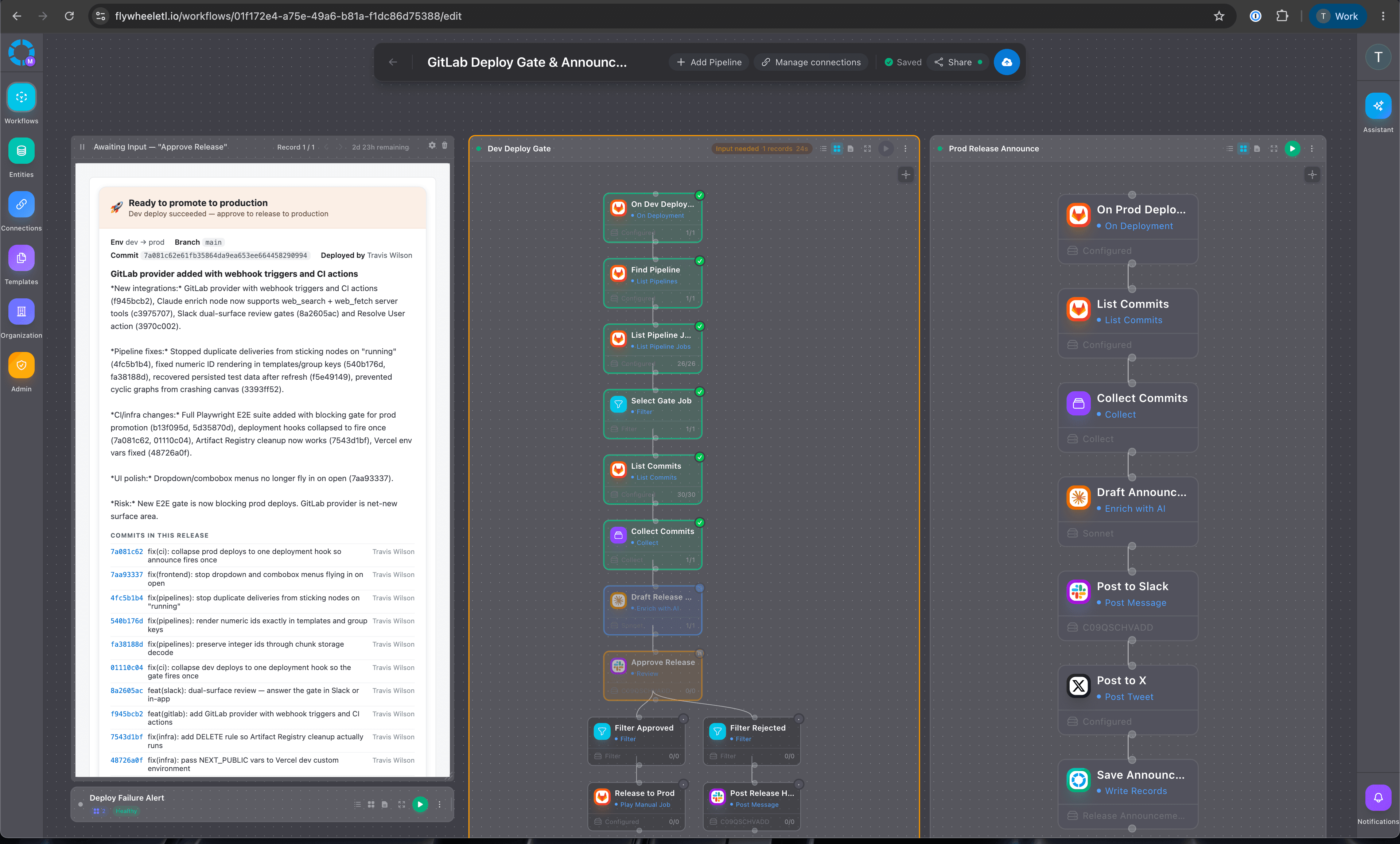
One cloneable worker, three webhook-triggered workflows. They share no state between them — the thing linking them is GitLab itself. That's the design: GitLab stays the source of truth for what's deployed; Flywheel supplies the judgment and the communication around it.
View the Deploy Gate & Announce template
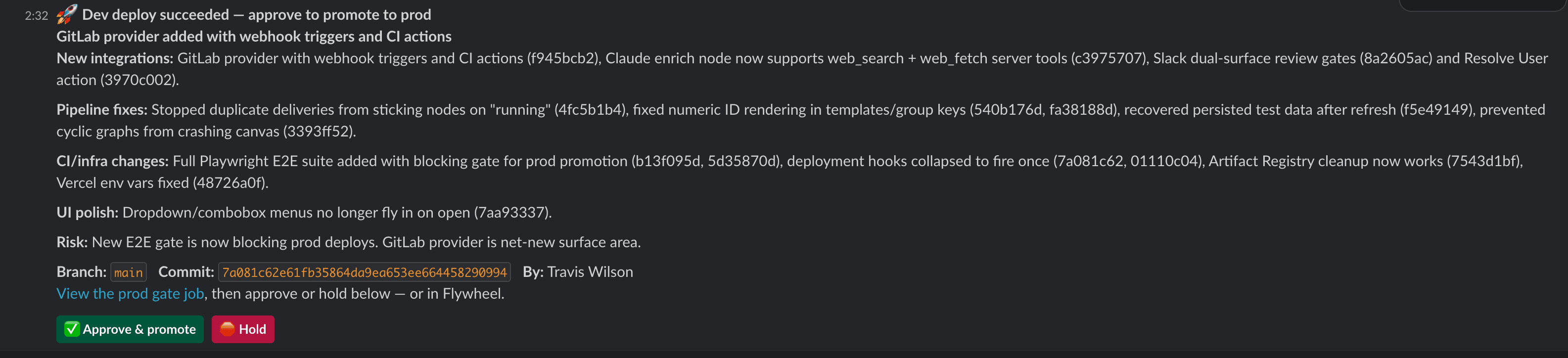
When a deploy to dev succeeds, the worker figures out what's about to ship: it reads the commits since the last production release and has AI write them up as a human changelog. That changelog lands in Slack with one question — approve this for production? One click on Approve and Flywheel plays your manual prod job in GitLab. One click on Reject and the release is held, with a note back in Slack.
When the production deploy succeeds, a second workflow picks it up and writes the announcement in four voices: a Slack post for the team, an X post for the public, a Reddit-style write-up, and a dev.to technical post. It auto-posts Slack and X, and saves the Reddit and dev.to drafts for you to post when you're ready.
Any CI pipeline that fails, on any branch, pages your Slack channel. One page per broken pipeline, whichever job broke it. No AI, no ceremony: just the alert you want within seconds.
The Detail That Matters: It Fails Closed
An approval gate you can't trust is worse than no gate. So the gate defaults to no: if nobody responds to the approval, the release times out as held — it never auto-promotes. The only path to production is a human clicking Approve. GitLab's manual job stays the mechanism; Flywheel just moves the button to where your team already is, with the context — the AI changelog, the commit links, who deployed — attached to it.
We're Dogfooding This
This isn't a template we built for a demo. Flywheel's own CI has a manual promote-to-prod job — dev deploy, smoke tests, then a human clicks play. Until now that meant someone opening GitLab, finding the pipeline, squinting at commit messages to remember what's in the build, and clicking ▶.
Now: the dev deploy finishes, an AI changelog shows up in our Slack, and approving from there releases production. When prod lands, the announcement writes itself. The release write-up you might see from us on Reddit? A Flywheel worker drafted it.
If we're going to tell you a worker can replace the recurring glue work in your week, our own release day is a fair place to prove it.
Setting It Up
Clone the template and a short wizard asks for the things only you know: which GitLab project, the name of your manual prod job, which Slack channels, and a couple of sentences about your product so the AI writes announcements in your context. Prerequisites are ordinary GitLab hygiene — your deploy jobs declare their environments, and your prod deploy is a manual job. That's it. Everything the wizard writes is editable on the canvas afterward: the prompts, the channels, the timeout, all of it.