



Slack Is Now a Flywheel Provider
Post messages, spin up channels, read history, and run slash commands and interactive approvals — all from a visual workflow. Slack stops being where you get notified and starts being where work happens.
Most tools treat Slack as a one-way bell — something pings you when a job finishes. Flywheel treats it as a full provider: a place a workflow can read from, write to, and pause inside while it waits for a human to decide.
Drop a Slack node anywhere in a workflow. Use it as a trigger, a delivery step, a place to collect a decision, or the source of data you summarize next. Same provider, different action.
What You Can Do
Send AI-written digests, alerts, and recaps to any channel. Pick the channel on the canvas or resolve it from a field at runtime.
Spin up a fresh channel mid-workflow and invite the right people — by static id or pulled from the record flowing through.
Pull messages from a channel as records — one per message — then filter, collect, and hand them to an AI node to summarize.
Kick off a workflow with /flywheel. Open a Block Kit form, collect input, and start a run from the submit.
Pause for a Human, Right in Slack
A review node posts a message with buttons and suspends the run. Someone clicks Approve, Skip, or whatever you label them, and the workflow resumes with their decision stamped onto the record. Set a timeout and a default action so it never hangs forever.
That's the piece most automation tools miss: not every step should be fully automatic. Some need a person to say yes. Flywheel lets that approval live where your team already is — no separate dashboard to check.
A Fun One: Slack Court
Every feature deserves a ridiculous demo. Slack Court is a one-click template that puts a teammate on trial for their crimes — losing at Dota, microwaving fish, merging to main on a Friday.
It uses nearly every Slack action in one workflow, and it's genuinely useful as a tour of what the integration can do.
Use the Slack Court template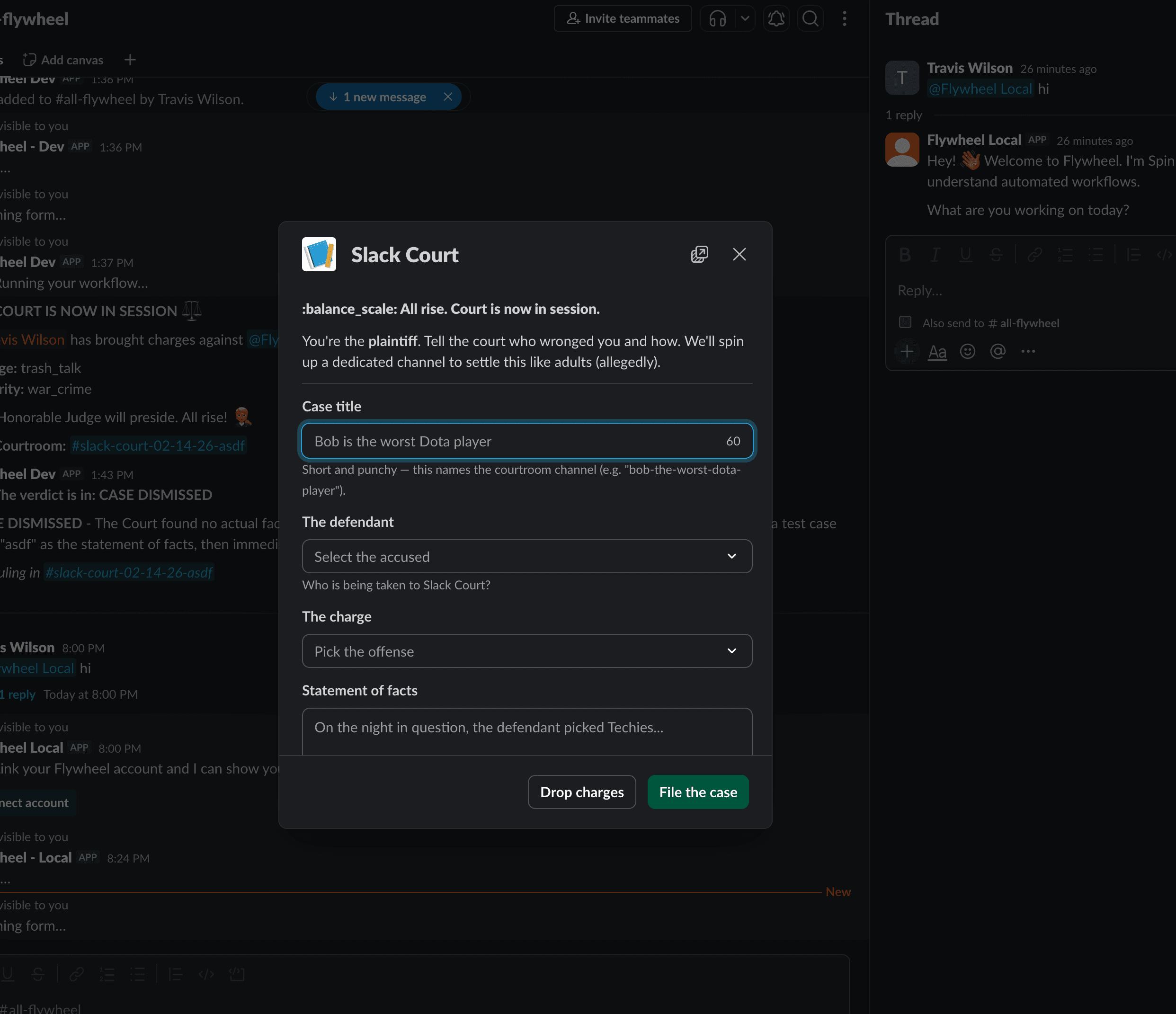
/flywheel slack-court opens a Block Kit form — collected and submitted without leaving Slack.File a case. Run /flywheel slack-court and a Block Kit form opens — defendant, charge, statement of facts, witnesses.
AI announces it. A clerk drafts a dramatic announcement, spins up a dedicated courtroom channel, and drags the defendant and witnesses in.
Deliberate. A 15-minute window opens with a 🔨 Adjourn court button. Argue your case. Anyone can gavel it early.
The verdict. AI reads the entire courtroom transcript, weighs the arguments, and hands down a ruling — with a recap posted back to the channel where it all started.
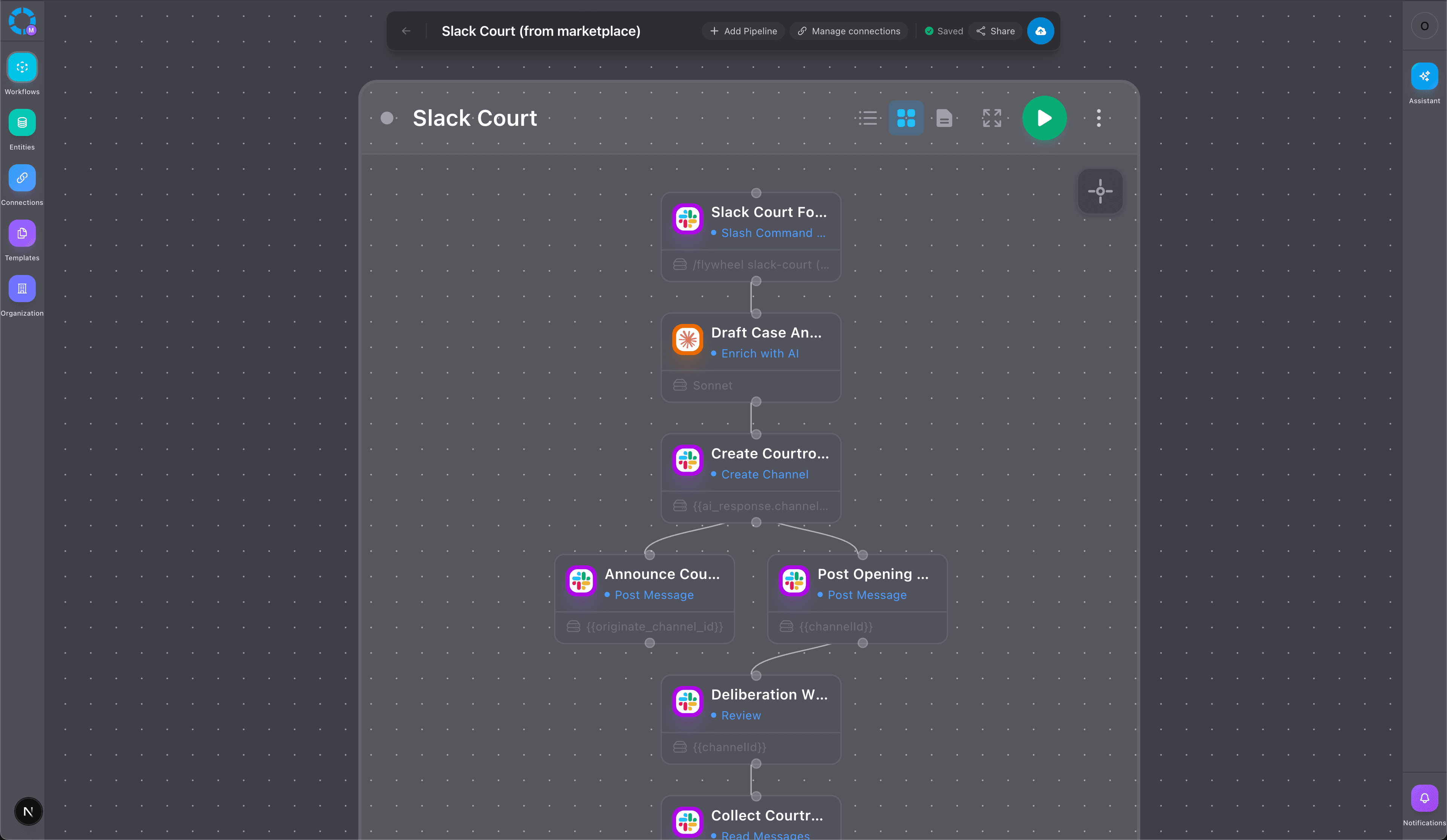
Under the hood it's a slash command trigger, an AI drafting step, channel creation with invites, parallel posts, a suspend-and-wait approval gate, a message read, a collect, a second AI judgment, and two more posts — one workflow. Clone it, then re-word the prompts or change the timeout on the canvas. It's yours to edit.
Get Started
Start from the Slack Court template and have it running in minutes, or build from scratch. Pair Slack with the AI nodes and your other connections, and it becomes the front door to your workflows — not just the place they shout when they're done.